Did You Know? A 7 Cups Facts Series: #15 (Reporting)

To ensure our community remains a safe and supportive space for everyone, it’s important to know how to reach us. The 7 Cups Helpdesk is our primary channel for reporting issues, as it allows our team to track, investigate, and resolve your concerns as efficiently as possible.
Whether you've encountered a technical glitch or a behavioral concern, here is a quick breakdown of how to find those reporting tools based on the platform's current layout:
1. Through the Helpdesk (Global Reporting)
If you have a technical bug or a general site issue, use the Helpdesk.
Where to look: Click your Profile Picture (top right of the screen).
The Action: Look for "Report an issue" in the dropdown menu. This creates a formal ticket for the 7 Cups support team.
2. Within a Chat (User/Behavior Reporting)
If you need to report a specific interaction or a member who is breaking community guidelines:
1:1 Chats: Look at the top right of your chat window for the three dots (...). Click there to find the report option.
Group Rooms: Similar to 1:1s, the "..." menu in the top right allows you to report the room or specific behavior.
To protect your comfort, in PMs, you can block. In the group rooms, you can mute users.
Did you know this?
Let us know in the replies if you learned something new!
(Missed any facts? Check the masterpost!)
Have a fact you want to share? If you would like to submit a fact to be featured in a future post, fill in this form (linked here).
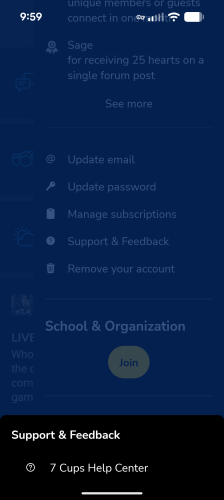
If you're on the app, click your profile picture and scroll down to Support & Feedback