Help Us Strengthen Group Chats

Hi everyone,
If you are a member, Thank you for being a source of inspiration, compassion, support, and care in the member group chats. Through your shares and support, you are encouraging others to share and get support too.
If you are a listener, thank you for being a compassionate supporter and group listener to ensure that members feel heard, supported, and comforted. You are making a difference in their lives.
But at times, we experience certain uncomfortable situations where some unsupportive users try to disrupt the conversation and supportive environment of the chat and make everyone feel stressed. 99% of those times, Moderators take necessary steps to take care of the event. But sometimes, they get stretched thin to do the needful for multiple group chats on time.
But do you know? You can also help group chats to be safe and secure for all.
You may or may not know, but you have certain powers too to strengthen a supportive environment for all.
You may know or notice it as the Mute/Report button.

When you click on it, it will open a pop-up like this:
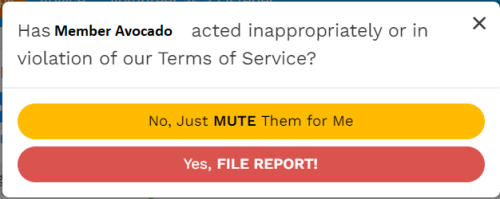
- Muting will allow you only to mute the user for you.
- Filing the report will allow it to send the report to the community team to review and take much-needed action for the specific user.
How to submit a report through “File Report”.
Step 1: When you click on file report, it will open a new pop window:
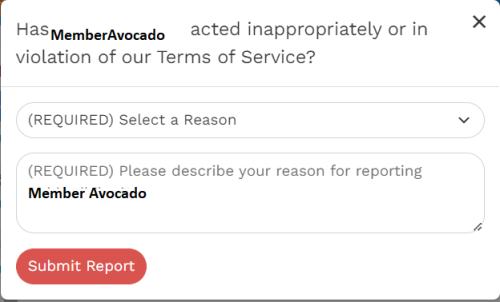
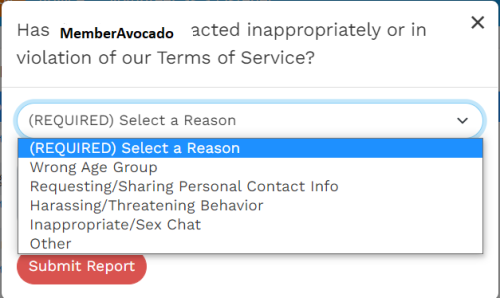
Step 2: Click on Select a reason that will allow you to see the list of reasons you can pick from:
Step 3: Once you select the reason, then explain the situation so the team is able to process the report swiftly.
A pro-tip: Select “Other” as the last option when you cannot select any other reason to categorize the behavior of the user. For example, if they are unsupportive, spamming, multiple accounts, you can select Harassing/Threatening Behavior to submit the report.
Gentle Reminder: With great powers, great responsibilities come too. Please ensure to use your mute/report powers wisely.
And thank you! You helped to strengthen the group chat's therapeutic environment by submitting the report.
I am grateful for all your help and support to keep the group chats as the most compassionate and supportive space for all.

@ASilentObserver
Thankyou for making this post, Obziee, good tip to report unsuitable and inappropriate behavior in the rooms.❤
Are these reports included in Behaviour Reporting Points thingy too?
Or Is there more insight on how these reports are processed, what kind of steps are taken/ how may it impact the user? (I understand confidentiality norms, so don't need any specific details ofcourse, but it is always more helpful to know that some sort of action *is* being taken and the reports do not wander around aimlessly reaching nowhere; more transparency is more encouraging always, I feel)
Grateful too, for everyone trying their best to keep rooms safe, inclusive, warm and welcoming.❤