Now Live! Updated Community Homepage
Hi everyone,
The awaited community homepage updates are now live! The community homepage now replaces the /home and /forum pages in the web version of 7 Cups.
This was a big overhaul from the team to try and make navigating our communities and forums much easier. The forum is a place where there is so much compassion and support expressed, and we want to make it easier for more people to get involved.
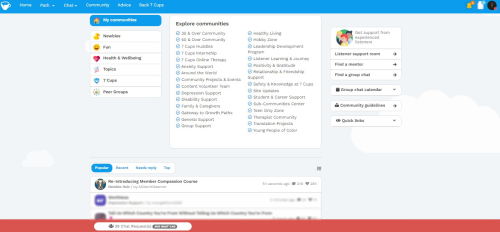
- The new community homepage design reflects the look and feel of the feed/dashboard homepages for listeners and members.
- The right sidebar also reflects the controls available on the member and listener dashboards.
- Community discovery and the ability to subscribe (and leave) are now as easy as one click.
- Our communities are now grouped into themes to make them easier to browse. Note that in the coming weeks we will be radically expanding the amount of communities available based on user feedback.
- The bottom half of the new community homepage also displays forum threads with a bonus option for an expanded view!
- You can heart and comment directly on forum posts from this page (if you don’t want to open them separately).

@SoulfullyAButterfly 🥳

@SoulfullyAButterfly It looks good but notice one thing that's missing the leader roles. This was missing when the homepage was put in too.
I am on mobile right now, will check on computer later.
Forums so far this seems really good!
@AffyAvo Hi, individual communities still have the old display and do have a Leaders tab if that's what you mean.
@SoulfullyAButterfly I didn't realize that when I click on home it's actually /dashboard. When it was announced this was replacing /forum and /home pages I thought it was the new dashboard.
Since /dashboard is remaining as is no problem!
@SoulfullyAButterfly I'm only seeing three communities in that page—on desktop and on mobile, both listener and member accounts, or not logged in at all. But in the app I still see all the communities.
Charlie
@RarelyCharlie Hi, can you make sure the "My Communities" tab on the left is clicked?
@SoulfullyAButterfly There is no My Communities button on my screen. I see it in your screenshot. If I join a community (I joined General Support) and refresh the page, then I do see a My Communities button, but clicking it doesn't do anything.
There's no relevant error message in the console. All the communities are present in the page source, but they are set not to display (class d-none).
Charlie
@RarelyCharlie (using a laptop right now). I can use the My Communities option to get to the communities I am subscribed to, they are clickable links for me. Not sure if you were saying the ones on My Communities didn't do this for you?
@AffyAvo I am not subscribed to any communities, so there's no My Communities button at all! And if I join a community the button doesn't appear until I refresh the page. But now that I know there's an invisible My Communities button, it all makes a little more sense.
Indeed, there's nothing to suggest that clicking one of the little circles is, in fact, joining a community. I found several aspects of this design confusing, although I think it's much better than what we had before.
Charlie
@RarelyCharlie Ah yeah I can see how that would not be intuitive if not subscribed to any.
@SoulfullyAButterfly Ah! I see how it works now. That user interface design is just terrible! Why does it not use a conventional design?
Charlie
1. There used to be a box near the bottom on the community (/home?) page where the guidelines were linked along with other links. 2 of the others were member reputation and listener reputation, as well as some others, I don't recall all of them.
I can no longer find a link to member reputation and listener reputation to get to the badges (and that was one of the only ways to filter listeners by badge). We may be missing some other links now as well, hoping someone else can chime in if they recall them.
2. It is available elsewhere but since this is the main page for forums now it would be ideal to have a forum search bar here.
@AffyAvo 1. Those links are now in the Quick Links card, both in Community Home and the Dashboard, at the bottom of the right-hand column on a big screen.
I have a searchable list of badges here: Find a badge (although it tends to get out of date).
Charlie