Group Support Resources Library : Easy Navigation

Great news everyone!
As we discussed earlier navigation challenges related to Group Support resources, forms, information, and updates and wanted to make it easier to access. We have tried to make it easy for you to swiftly navigate through important information and resources of Group Support. We created a “Group Support Resources Library” (Master Form).
All you need to do is a bookmark or save it for future reference. Also, share and pass it to others, so we can make the navigation efforts easier for everyone. We will continue to update and take steps to improve the navigation.
Click here to check out and bookmark/save (Clickable link) 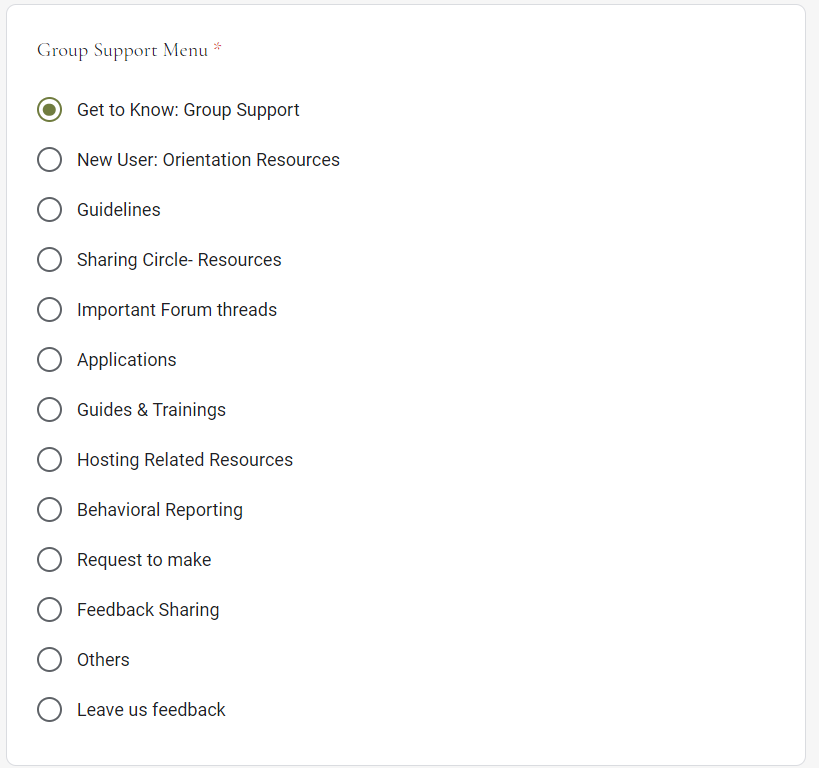
We look forward to seeing you in the Group Chatrooms! Click here to visit today!

Thank you for sharing this- it is an awesome compilation!!!

@ASilentObserver woah! This is really cool. Thank you for putting in efforts to make it! I'm gonna explore it more :o

Wowziee, @ASilentObserver, this looks fantabulous! Thanks to the entire GS team! ❤

@ASilentObserver Please add this to the resources so it's easy to find. Bookmarking shouldn't be necessary to find key resources.

@ASilentObserver It's great that we have this kind of resource library!
Hmm, I'm just wondering if google form is much easier to use than google sheets? I remember, back in my days, google sheets were a lot more used for resource library

@ASilentObserver
😮 ooh, this shall definitely come in handy 💕
i like 😀

@ASilentObserver thank you so much for this useful navigation post !! and thank you for taking the time to put it together :) <3

@silentobserver thank you so much for taking the time to put this together! I can't imagine all the time and effort you put into this.
Once again, thank you so much!

Thank you so very much for sharing this with us! ❤️

@ASilentObserver
can't use or use lots else without google account---won't allow---excludes you
@IcedCoffee211109 I can use the form when I'm not signed in. Was this a change made or are you still having issues accessing it?
@AffyAvo
Affy,
I have had many problems trying to use various forms. I get the message up top that I must log in with a Google account....... this has been occurring......
I do not log into 7cups with a Google accout as i used to in the past. I used to in the past. That account in the past that was used was deleted, as requested. Later, I did decide to create a new account. I went by the rules. I came in with a new account, with an email address, which is NOT a Google email address. Thus, all the problems since then.
It just gets a little tiring with all the "inclusive" "stuff" 7cups protrays, yet you cannot do so much without a Google email address attached to your account.
Even today, recently as today, 1/22/22, EST the same issue still is here. You cannot fill out almost every form I tried to fill out that was presented for "everyone."
So, yes, this is ongoing.
Yes, this does not allow you to be included if you do not choose to include a Google email account. I assume this is because the 7cups platform has business with Google and business is involved.
I am a small fish and a nobody. I know this. I know I do not matter.
7cups claims to be inclusive and for everybody. Does everybody only include everybody if you include a Google account?
I am nothing and a nobody. I mean nothing. I will be shut down. It is no big deal. But what if this is to others that care about this?
I assume that 7cups will just come back with some statement to the effect to run the platform we must, blah, blah.... and we have chosen to use Google and we utalize Google blah........................so take it or leave it
It is all a big company decision. Watch where it all goes in a few years and then a few more years..........
I am nothing. I matter zilch to here.
I will go on with my life.
@IcedCoffee211109 I am still logging into 7cups with a very old email address (prior to gmail).
I 100% agree with you everything here for users should not require a gmail account.
Can you/ what error message do you see if you
1. Try to open the form
2. Select an option on the form, for example guidelines?
3. Click next?
4. Try to click on of the links?
@AffyAvo I just tried it with my phone, not signed into gmail.
Near the top of the form it does ask me to sign in to save my progress, but I can use the entire form without saving my progress.
It just means if I close it and come back later I have to tedo any fields I filled previously.
@AffyAvo
Hi Affy,
I've been trying to find a way to get to another "form" but cannot for right now. I have tried to go to many community rooms, attempting to find a way to find a form in one to fill out there, some kind of way; unfortunately, I have not found a form in any way, just ways to sign up for tag lists and such. I am sorry, Affy, I just don't know how to "find" a form.
I do know that when I have tried to fill out the forms, at the top, it always wants me to fill in a gmail email address right up top within the first 3 or so lines. I can do what I want on the form, but it will not be worth anything, as it will not serve any purpose without filling in that gmail email address up top, as it requires that to save the data on the form.
I am very sorry that I cannot remember the error words that come up in red font. But this occurs every time the user's account email address field is comprised of "not" a gmail email address. The software has been coded to flag this. The software is now coded to auto fill the user's account email address in the field up top. The software is also coded to even auto fill my user account email address and change the end of it, after the " @ " to " gmail.com" So, the software is auto coded to flag this, generate the message to me, the user, in red font, about changing to a gmail address, and changes the ending part of my user account email address to a gmail email address, and auto fills this in this field.
I am so sorry I cannot find a way to find a form to get to access now, so I can see exact words the software auto generates to me, the user. I wish I could find a form and provide these exact words for you, Affy.
@IcedCoffee211109
The form was linked in the first post of this thread:
https://docs.google.com/forms/d/e/1FAIpQLScD8ZdOYV8prVdarRPRdjMZ9WonrQScPriVA1odH4vGSEuDDw/viewform
An email address is only needed if you want to partially fill out a form and return to it to fill out the rest later.
Without an email address, when you hit submit, it still submits the data to the account of the person who made the form. So the person who makes it definitely needs a gmail account, but you or I do not need to use an email address to submit that information.
For this form in particular it's also still useful even without getting to the point of submitting, it offers links for multiple resources.
Hopefully that helps!